
Pause deployments instantly — without deleting, rebuilding, or losing your setup
We’re excited to introduce a new way to manage your content more efficiently: Disable Deployment.
This update gives you the flexibility to temporarily turn off deployments without deleting them – so you can keep your setup clean, organized, and ready to go at any time.
Why this matters
Until now, removing a deployment meant it would be removed from your active list. With this new feature, you can now pause deployments instead of removing them, making it easier to:
- Manage seasonal or time-based content
- Test layouts without losing configuration
- Keep your deployments intact and organized
How it works
Disabling a deployment is fast and intuitive:
- Navigate to the Players page
- Open the Deployment tab
- Locate the deployment you want to manage
- Toggle it off to disable, or on to reactivate
That’s it – no reconfiguration required.
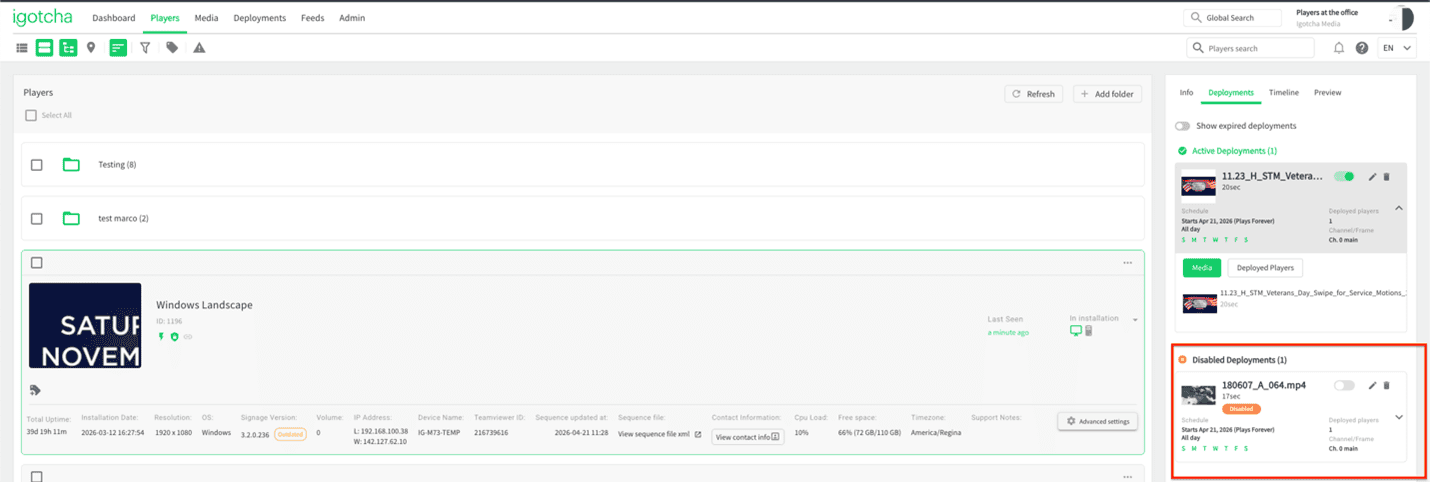
To keep things organized, disabled deployments aren’t hidden or lost. Instead:
- They’re moved to a dedicated Disabled Deployments section
- Positioned at the bottom of the Deployment list
Built for flexibility
This feature is designed to give you more control over your signage environment without adding complexity. Whether you’re managing a single screen or a full network, Disable Deployment helps you stay agile while keeping everything in place for future use.
If you have any questions or need help setting this up, our support team is happy to assist: support@igotchamedia.com
